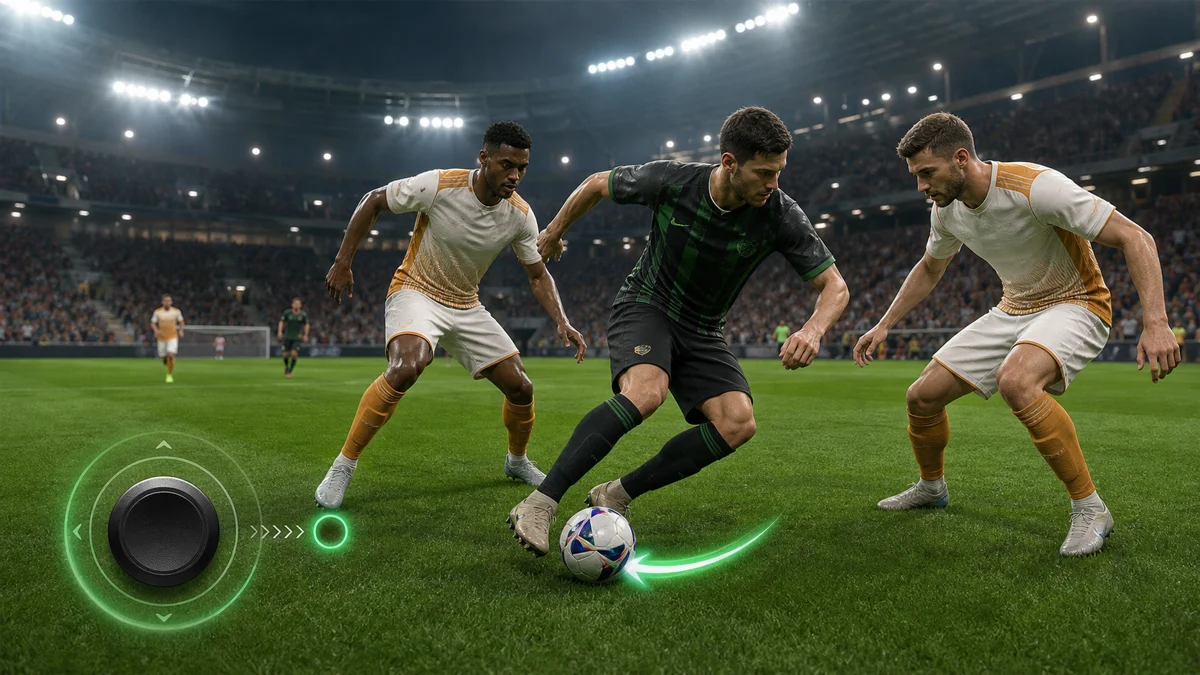
Quick answer: to stop losing the ball in eFootball, reduce the distance of your directional input, return the joystick to neutral before a major change of direction, and accelerate only after the defender commits. The Soccer Squad tutorial builds this idea into four repeatable techniques: micro-touch dribbling, a quick-reset 180-degree turn, a stop-and-go burst and a properly aligned Double Touch. None of them depends on frantic stick movement. Each one gives the game one clear instruction at a time.
The video demonstrates the techniques on mobile, but the underlying dribbling logic applies to every current version of eFootball. A thumb leaving the touchscreen, a left stick returning to center and a released directional key all create the same tactical event: a short neutral input. Exact buttons for dash, feints and Double Touch vary by platform, controller settings and Feint Command Type, so this guide translates the principle instead of pretending that one mobile gesture is a universal command.
What is the most important joystick trick in eFootball?
Use a deliberate three-part rhythm: controlled direction, brief neutral input, then the new direction. Add dash only when the exit lane is open. This makes the next touch smaller, the turn cleaner and your intention harder for the defender to read.
Why holding dash makes the ball easy to steal
Many lost possessions begin before the tackle. The attacker receives the ball while dash is already held, the first touch travels farther than necessary, and the user tries to repair the mistake with a wide joystick swing. The defender does not need a perfect manual challenge. Match-up positioning, pressure and assisted tackle behavior can attack the exposed touch while your player is still trying to gather the ball.
Dash is not the problem by itself. It is the order of operations. Acceleration should convert created space into distance; it should not be the tool used to create space in a crowded area. When a defender is within one or two steps, every extra meter between player and ball increases the interception window. Close control keeps more options alive: turn, stop, pass, shield or accelerate.
The second problem is random steering. If the joystick is continuously dragged around its full radius, eFootball receives a stream of changing directions. Your player must rotate the body, move the support foot and relocate the ball for each request. That produces the heavy, circular turns seen when players panic. Clean dribbling is not faster because there are more inputs; it is faster because unnecessary inputs are removed.
The universal control model: radius, neutral, direction, acceleration
Think about every dribble as four variables. Radius is how far you move the stick or finger from its center. Neutral is the moment no direction is requested. Direction is the next lane you deliberately choose. Acceleration is the separate decision to attack that lane. If these four events blur together, touches become large and corrections arrive late. If they are separated, even a basic player can look composed.
- Small input radius: asks for a shorter directional movement and helps keep the next touch within playing distance.
- Neutral input: clears the previous direction before a sharp stop or reversal.
- One exit direction: avoids a slow circular rotation through several unwanted angles.
- Late acceleration: turns open grass into progress without exposing the ball while the lane is still closed.
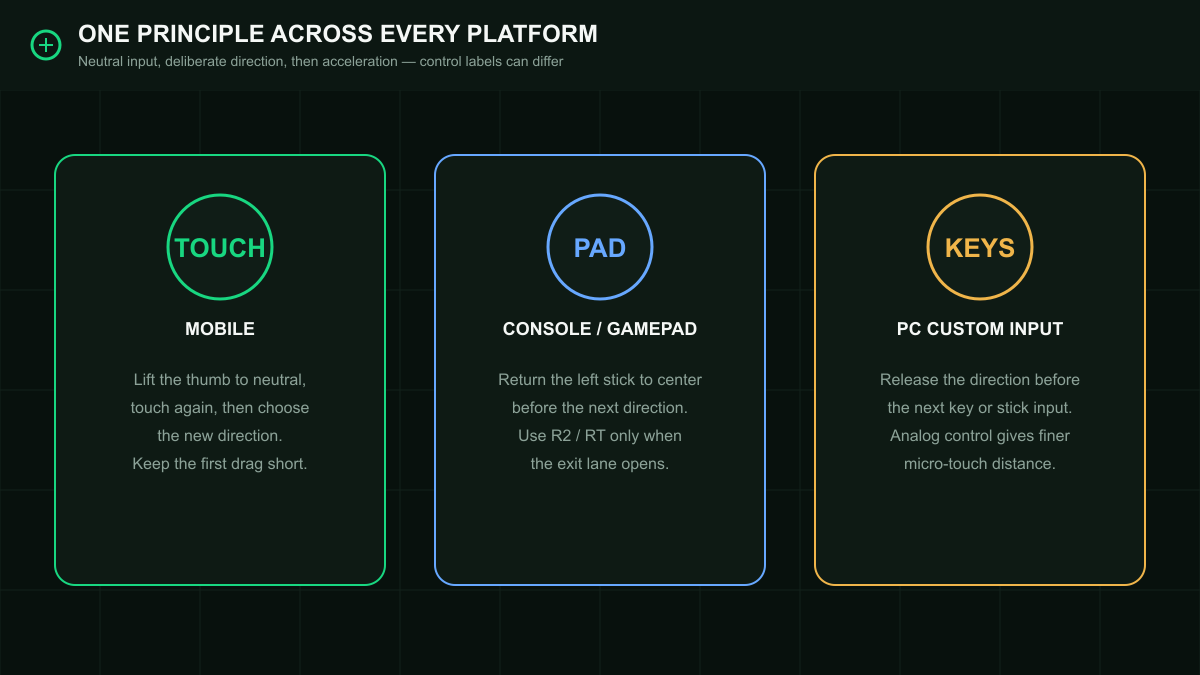
How to apply the same technique on mobile, console and PC
Mobile: release means release
On touch controls, lifting the thumb completely is more reliable than trying to find the visual center while still touching the screen. Re-touch only when you are ready to send the next direction. For micro touches, make the first drag short. For a sharp reset, let the screen register a true release before the opposite input. The Soccer Squad demonstration uses this clean lift-and-re-touch rhythm throughout the tutorial.
Console or gamepad: let the left stick recenter
On PlayStation, Xbox or a PC gamepad, release pressure and allow the left stick to return to its physical center. Do not roll the stick around the rim from right to left when you want a direct reversal. The official eFootball control manual separates normal dribbling, dash dribbling, quick stops and feint inputs; your exact trigger labels can differ, but the neutral-stick principle remains the same. Add R2 or RT only when your selected layout uses it for dash and the lane has opened.
PC keyboard or custom input: create a neutral beat
With digital direction keys, release the current direction before pressing the next one. The technique still works, although a keyboard cannot reproduce the same fine input radius as an analog stick. A controller offers more granular micro-touch distance, while keyboard users should focus on shorter taps, cleaner neutral timing and earlier passing decisions. Custom bindings take priority over any button names in this guide.
Technique 1: micro-touch dribbling without dash
Micro-touch dribbling is the base layer. Starting around 00:47, the tutorial asks you to stop dragging the joystick far from center. Imagine the input area as two circles: a small inner zone for keeping the ball close and a large outer zone for covering ground. In traffic, stay inside the small zone. The objective is not to move slowly forever; it is to preserve the ability to change the next touch.
The cleanest drill is an invisible cone slalom. Move diagonally left, then diagonally right, using only enough input to place the ball on the other side of the player. Each touch should leave the ball close enough for the following correction. Do not hold dash. If your player needs several running steps to recover the ball, the input was too large. If the body barely changes lane, the input was too small. Find the middle point where every touch has a clear purpose.

Micro-touch drill: 20 clean repetitions
- Enter Free Training with a midfielder or winger whose dribbling animations you already know.
- Walk toward open space without dash, then make one short diagonal input.
- As the touch settles, make one short diagonal input to the opposite side.
- Complete five left-right pairs without letting the ball escape beyond a comfortable next touch.
- Repeat four sets. Restart the count whenever you accidentally hold dash or make a full-radius input.
In a match, use micro touches when a defender is containing rather than diving in. The first small change tests whether the opponent follows your hips, protects the passing lane or triggers a second presser. Because the ball remains close, you can answer the reaction instead of guessing before it happens. This is especially useful between the touchline and the edge of the penalty area, where one extra lane can create a cutback.
Technique 2: the quick-reset 180-degree turn
The second trick solves the slow U-turn. A common mistake is rotating the joystick through a semicircle while the player runs. That asks the body to visit several intermediate angles, so the turn becomes wide. The tutorial’s quicker method is direct: move or sprint in one direction, lift the thumb or release the stick completely, then input the exact opposite direction after the neutral beat.
The reset matters more than raw speed. Without it, the previous direction and the reverse direction overlap. With it, eFootball receives a clear stop followed by a new command. The player still needs time to plant and turn, but the route is shorter and the ball is less likely to swing into the defender’s tackling path. Practice first without pressure, then add a passive defender as a visual cue.

One correct 180-degree reset
- Carry the ball forward for two or three touches.
- Release the directional input completely; do not begin the reverse while the stick is still off-center.
- Let the player show a short stop or weight shift.
- Input the exact opposite direction once, then stabilize the stick instead of adding corrections.
- Accelerate only if the defender has continued past the turning point and the return lane is free.
Use this turn when a defender approaches from the side or when your winger reaches a dead end near the line. Do not use it when a second defender already covers the return lane. A technically perfect reversal into a waiting opponent is still a bad decision. Scan before the reset: if the safe outlet is behind you, turn; if the opponent has compressed both directions, pass before contact.
Technique 3: stop-and-go with a 45-degree exit
Stop-and-go dribbling attacks the defender’s timing. From roughly 02:15, the tutorial uses a winger running down the touchline. The attacker releases the directional input to stop, waits for the body and ball to settle, then combines a 45-degree movement toward the inside with dash. The pause invites the defender to keep moving; the diagonal burst attacks the space their momentum leaves behind.
The stop must be real. If you only reduce the stick slightly while dash remains active, the player decelerates but does not reset. That half-stop is easy to track because the defender never has to make a new decision. A complete release creates a visible question: continue down the line, turn back or cut inside. The burst works because all three options briefly look possible.

Wing drill from the Soccer Squad tutorial
- Start near the touchline and carry the ball forward at running speed.
- Lift the thumb or release the left stick completely to stop.
- Wait until the ball is controlled under the player rather than still rolling ahead.
- Choose the inside lane at about 45 degrees and apply dash at the same moment as the exit input.
- Perform 10 to 15 repetitions on the right wing, then repeat the same number on the left wing.
Vary the length of the pause once the mechanics are stable. If every stop lasts exactly the same time, experienced opponents will preload the inside lane. Sometimes restart down the line, sometimes pass backward and sometimes use the diagonal burst. The joystick trick creates an advantage only when the defender cannot predict which branch follows the stop.
Technique 4: align Double Touch with the player’s body
Double Touch fails when it is treated as a panic button. From around 03:00, the video emphasizes alignment: the preparation and exit must make sense relative to the direction the player is facing and running. A command aimed at the screen’s top-left is not automatically the player’s top-left after the body has rotated. Read the chest, plant foot and current ball side before starting the skill.
The tutorial demonstrates a 10 o’clock preparation relative to the player’s facing direction, then a forward exit. Treat that clock position as a training reference, not a fixed screen coordinate. Rotate the imaginary clock with the player. First lock the central reference, then make the preparation and exit as two deliberate directions. Randomly swiping or rotating the stick breaks the alignment and often sends the animation toward the defender.

On mobile, the tutorial’s gesture combines the relevant dash/skill input with a directional flick. On a gamepad using Advanced feint commands, eFootball’s control manual describes a right-stick preparation followed by a left-stick exit; Smart controls or custom layouts can behave differently. Learn the command shown in your own in-game Command List, but keep the same tactical rule: align first, prepare second, exit through space third.
Double Touch alignment drill
- Stand with the player clearly facing one direction and identify an imaginary forward line through the body.
- Place a passive defender or cone slightly outside that line.
- Use the 10 o’clock preparation relative to the body, not relative to the screen.
- Send the exit forward through the defender’s outside shoulder.
- Repeat at walking speed, then approach at a jog. Add match pace only after eight of ten attempts exit through the intended lane.
How to choose the correct trick during a match
Mechanics become useful when they answer a specific defender behavior. Do not decide before kickoff that you will perform ten Double Touch moves. Read the pressure. A defender standing off gives you time for micro touches. A defender sprinting at your side can be punished by a reset turn. A fullback matching your run down the line is vulnerable to a stop-and-go. A defender stepping square into one lane can be beaten by an aligned Double Touch through the other.
- Defender contains and protects the box: use one or two micro touches to move the passing angle.
- Defender overruns the ball side: reset to neutral and reverse 180 degrees.
- Defender mirrors a straight sprint: stop completely, then burst diagonally inside or restart outside.
- Defender commits a foot into a clear channel: align Double Touch and exit beyond the tackling leg.
- Second defender closes the escape: pass. Ball retention matters more than completing a trick.
The player attributes that help close control
Technique is the input layer, but player profiles change the margin for error. Ball Control influences how cleanly a player receives and settles possession. Dribbling supports movement with the ball at speed. Tight Possession is especially relevant in compact spaces and low-speed turns. Balance helps the player remain functional through changes of weight, while Acceleration determines how quickly the player can exploit the lane after it opens.
Physical Contact can help in collisions, but it does not replace correct ball positioning. A strong forward with a long touch can still be intercepted before contact becomes useful. Likewise, a small technical player should not invite shoulder-to-shoulder duels simply because the dribbling numbers are high. Match the technique to the card: agile players can chain smaller corrections; powerful players often gain more from one protected touch followed by a direct exit.
Player skills matter for the fourth technique. Double Touch is more reliable when the card has the appropriate skill and the animation fits the body state. Special combinations such as Sole Control and Flip Flap can change how some players execute related moves, but the guide’s alignment principle remains valid. Test the exact card in Free Training before assuming every player will produce the same animation.
First touch, body shape and shielding before any trick
A joystick trick cannot rescue every bad reception. Before the pass arrives, identify pressure and decide which side of the body should protect the ball. Receive away from the defender, avoid holding dash through the first touch, and let the player establish control. If contact arrives early, shielding may trigger from body position and proximity; forcing another turn while the ball is exposed often makes the situation worse.
The previous FootEx quick-turn masterclass goes deeper into first-touch direction, automatic shielding and the early reverse input used while a turn is still settling. Combine that lesson with this guide: use clean reception and protected ball side to establish control, then choose micro touch, full reset, stop-and-go or Double Touch according to the defender’s movement.
Common mistakes and the exact correction
- Mistake: holding dash from reception to exit. Correction: receive and create the lane at normal speed, then accelerate.
- Mistake: moving the stick around its full outer edge. Correction: return to center and request one direct new direction.
- Mistake: making micro touches too large. Correction: shrink the input until the ball remains within one immediate correction.
- Mistake: reversing before neutral is registered. Correction: exaggerate the release in training, then shorten the pause gradually.
- Mistake: performing stop-and-go while the ball is still rolling. Correction: wait for the controlled stop before the diagonal burst.
- Mistake: aiming Double Touch by screen coordinates. Correction: rotate the imaginary clock with the player’s body orientation.
- Mistake: repeating the same trick. Correction: use the same setup with at least two different exits.
- Mistake: dribbling into a second defender. Correction: scan the destination before committing to the mechanic.
A 10-minute eFootball dribbling routine
Train control before speed
- Minutes 0–2: micro-touch zigzags without dash. Count only sequences in which every next direction remains available.
- Minutes 2–4: direct 180-degree turns. Alternate left-right and up-down resets, making the neutral beat visible.
- Minutes 4–6: stop-and-go exits from both touchlines. Mix inside bursts with occasional straight restarts.
- Minutes 6–8: aligned Double Touch at walking and jogging speed. Score the intended exit lane, not whether an animation merely appeared.
- Minutes 8–10: free sequence against a passive defender. Choose the move from the defender’s position instead of following a preset order.
Do this routine before ranked matches rather than trying to learn inside Division games. Free Training removes result pressure and lets you notice input size. Once the pattern is stable, play AI matches at a speed where you can still read the defender. Only then test it online, where latency shortens the correction window and punishes late commands.
How to adapt the tricks to online input delay
Online play does not change the sequence, but it changes how early you must commit. Avoid rapid corrective inputs because delayed commands can queue and appear after the moment has passed. Use fewer, clearer directions. If the connection feels heavy, increase the space required before attempting Double Touch and choose the simple reset or pass more often.
Watch the ball rather than only the player model. A neutral input is useful when the ball is close enough to be controlled; releasing while the ball is already far ahead cannot pull it back instantly. Connection quality, player animation and current momentum all affect timing. The reliable goal is not a fixed number of milliseconds but a repeatable visual cue: ball close, body balanced, next lane visible.
Dribbling and defending are the same reading problem
The attacker is trying to move the defender’s weight; the defender is trying to delay commitment and close the pass or dribble lane. Studying both sides improves decision-making. The FootEx defense masterclass explains match-up, interception lanes, second-man pressure and manual switching. When you understand what a disciplined defender wants to protect, you can use a small touch or stop to ask a more difficult question.
This also explains when not to dribble. If the opponent keeps a compact body shape, blocks the inside lane and has cover behind, no joystick trick creates a guaranteed route. Move the ball, reposition and attack the next defender under worse conditions. Keeping possession is the objective; the mechanic is only one method.
Match checklist: keep the ball before trying to beat the player
- Scan pressure and the second defender before receiving.
- Take the first touch away from contact and without unnecessary dash.
- Use a small input radius when the defender is close.
- Return to neutral before a full stop or direct reversal.
- Align feints with the player’s facing direction.
- Accelerate after the lane opens, not while trying to discover it.
- Pass when the exit is covered. A retained attack is better than a forced highlight.
Final verdict
The secret is not a hidden skill combination. It is input discipline. Micro touches protect the next decision, the 180-degree reset removes the slow circular turn, stop-and-go manipulates momentum, and Double Touch becomes reliable when preparation and exit are aligned with the body. Train each pattern alone, then choose it from the defender’s behavior. That is how joystick movement becomes real eFootball close control instead of random dribbling.
Start with the smallest possible success: five clean micro-touch zigzags and five direct resets without dash. Once those feel automatic, add the wing pause and aligned Double Touch. The result should not be more tricks per match. It should be fewer cheap losses, more controlled exits and a clearer reason behind every touch.